HD Minecraft Skins (128×128) in 2026: What Works on Java, Bedrock and Mobile
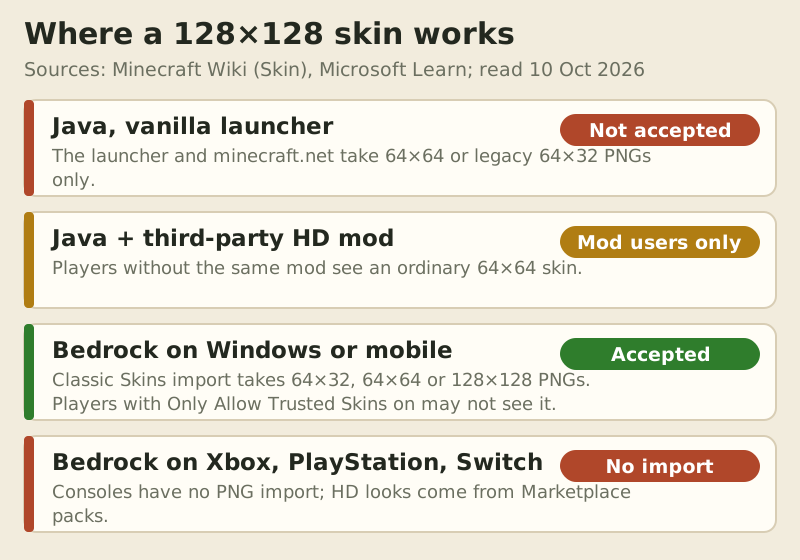
Short answer: HD Minecraft skins, meaning 128×128 skins, work natively in one place only: Bedrock Edition on Windows and mobile. There you can import a 128×128 PNG straight from the Dressing Room. Java Edition's launcher takes only 64×64 (or the legacy 64×32), so a 128×128 skin on Java needs a third-party mod, and only other players running that mod see the detail. Consoles can't import any PNG at all.
That corrects the line we used to run here, that vanilla shows 64×64 only. That's true of Java and wrong for Bedrock, and the difference decides whether an HD skin is worth your time. This guide gives the answer per edition, a routes table and a side-by-side of the same face at both sizes, and explains what the "HD skins" apps on your phone actually are. Facts were checked on 10 Oct 2026.
Short answer per edition
Java Edition: no native HD. The Minecraft Launcher and the minecraft.net profile page accept a 64×64 PNG or a legacy 64×32 file. A larger file needs a mod on your side and the same mod on every viewer's side.
Bedrock on Windows, Android and iOS: yes. The Classic Skins import in the Dressing Room accepts 64×32, 64×64 and 128×128 PNGs. You still choose Classic or Slim arms as usual. The catch is visibility. Players who keep Only Allow Trusted Skins switched on may not see a custom import, yours included.
Bedrock on Xbox, PlayStation and Switch: there's no file import, so there's no route for your own HD file. Detailed looks on consoles come from Marketplace packs or the Character Creator.
Routes compared
| # | Route | Edition | Max file you can use | Who sees the detail |
|---|---|---|---|---|
| #1 | Launcher / minecraft.net upload | Java | 64×64 (or legacy 64×32) | Everyone, at 64×64 |
| #2 | Third-party HD skin mod | Java | Larger than 64×64 (depends on the mod) | Only players running the same mod |
| #3 | Dressing Room › Classic Skins import | Bedrock: Windows, Android, iOS | 128×128 | Others, unless they have Only Allow Trusted Skins on |
| #4 | Marketplace skin packs | Bedrock, all devices incl. consoles | Set by the pack creator | Everyone on Bedrock |
| #5 | Phone "HD skins" apps | Bedrock on mobile | 128×128 files from the app | Same as a Bedrock import; the app is unofficial |
Sources: the Minecraft Wiki's Skin page and Microsoft's Bedrock creator documentation, both read in October 2026. We don't name a specific Java HD mod as "the one that works". Mods break and change hands between game versions, and we can't verify one for every version you might run.
What 'HD' means here
An HD skin is the standard skin layout drawn on a bigger grid. A 64×64 sheet gives each layer 1,632 usable pixels. A 128×128 sheet gives each layer 6,528, four times as many, according to the Minecraft Wiki. The model doesn't change. Your character is the same blocks at the same size, and the extra pixels only make the paint finer. That's why an HD skin can carry eye highlights, freckles or fabric texture, but can't give you a rounder head or a flowing coat.
If you're new to the layout itself, our skin file format guide explains the 64×64 sheet that HD templates scale up from.
Java: mods only, seen only by mod users
Java checks a skin through Mojang's services before other players' games will display it, which is why the launcher's size rules are the real limit. To show a skin larger than 64×64, you need a third-party mod or skin service that replaces how skins are fetched and drawn. Everyone who doesn't run the same mod still sees an ordinary 64×64 skin, or your fallback default.
That makes HD on Java a private-club feature. It suits a modded server where every player installs the same pack, or close-up renders and screenshots. It's a poor fit for public servers, where almost nobody will see the difference. Expect to re-check the mod after each Minecraft update, because skin mods are among the first to break.
Bedrock: imports, packs and geometry
Bedrock is where HD actually works without mods. On Windows, Android or iOS, the Dressing Room's Classic Skins tab takes a 128×128 PNG directly: import it and pick the arm model. Microsoft's creator documentation says that if the game won't recognise a custom skin, Only Allow Trusted Skins should be switched off under Settings > General. The same setting on other players' devices can stop them seeing custom imports, so a friend who sees you as a default skin may simply have it switched on.
The very detailed characters in the Marketplace go further than resolution. Many use custom geometry, meaning extra 3D shapes such as hats, hair or props, which no flat PNG can add, whatever its size. If you want that, a paid pack is the route. You can browse HD-style packs in the official Minecraft Marketplace. That link is an affiliate one, so SkinSteps may be paid a small share if you buy, at no extra cost to you. Packs are priced in Minecoins, and we don't quote prices because they change.
Mobile "HD skin" apps: what they are
Search for HD skins on a phone and the top results are apps. The biggest we looked at, "HD Skins for Minecraft 128x128" by Crone on Google Play, showed more than 10 million downloads and contains ads, as of 10 Oct 2026. Its listing calls it "an unofficial application for Minecraft Pocket Edition" that is "not affiliated in any way with Mojang AB". Apps like this are skin catalogues, often of user-uploaded designs, and some of those are copies of characters from other franchises. They hand you a 128×128 PNG, which you then import into Bedrock the normal way.
They don't unlock anything the game can't already do, and they can't make HD work on Java or consoles. Treat any app or site that asks for your Microsoft password, or that bundles a modified launcher, as a trap. Unofficial "cracked" launchers can't show official skins at all, because they have no real account to fetch them from. If an HD skin page pushes one, close it.
64×64 vs 128×128 side by side
Here's the same face drawn twice at the same physical size. On the 64×64 sheet the front of the head is 8×8 pixels, and on the 128×128 sheet it's 16×16. The bigger grid fits eye whites and highlights, brows, a shaded nose and stubble. The smaller one has room for two eyes and a mouth.
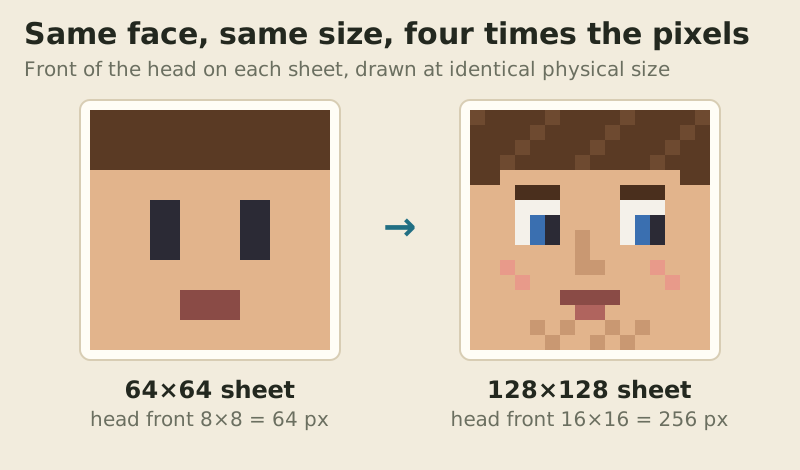
Whether that detail matters depends on distance. In normal play other players appear a few dozen pixels tall on your screen, and the gap between the two versions mostly vanishes. It shows in close-ups, thumbnails and screenshots.
Is it worth it?
On Bedrock for Windows or mobile, yes, if you enjoy the detail. The import is free and native, and the only downside is that players with trusted-skins filtering may not see it. On Java, usually no. You'd be maintaining a mod that most players won't have. A sharp 64×64 skin with good shading reads better at play distance than a muddy 128×128 one. On consoles, the question doesn't arise: buy a pack, use the Character Creator, or make the skin on a phone or PC on the same account and hope it syncs.
HD is not a performance problem either way. A 128×128 PNG is still a few kilobytes, and it won't slow your game down. When you're ready to apply a skin, our step-by-step guide to changing your Minecraft skin covers every edition, and the Bedrock install guide walks through the Dressing Room import.
Capes and other 'HD' confusion
Many HD skin searches are really after something else, such as capes, animated looks or the 3D Marketplace characters. Capes are a separate account item that you earn rather than draw. Official ones come from Mojang promotions and show for everyone, while mod capes show only to that mod's users. 3D shapes come from Marketplace geometry. None of them arrive by uploading a bigger PNG, so be wary of any page that promises HD skins, capes and animations from a single download.
HD skin questions
Can you have HD skins in Minecraft?
Yes on Bedrock for Windows, Android and iOS, where the Dressing Room imports a 128×128 PNG. On Java, only with a third-party mod, and only players running that mod see the detail. Consoles can't import custom PNGs.
What resolution are HD Minecraft skins?
Usually 128×128, which has four times the pixels of the standard 64×64 sheet: 6,528 usable pixels per layer instead of 1,632. Some Java mods accept larger files.
Do HD skins work on Bedrock?
Yes. Import the 128×128 PNG from Dressing Room › Classic Skins on Windows or mobile and pick Classic or Slim arms. If it doesn't show, check Only Allow Trusted Skins under Settings > General.
Can other players see my HD skin?
On Bedrock, most can, but players with Only Allow Trusted Skins on may not see custom imports. On Java, only players using the same HD mod see the detail; everyone else sees a standard skin.
What is the Minecraft Java skin resolution?
Java's launcher and minecraft.net accept a 64×64 PNG, or the legacy 64×32 layout, which has an outer layer for the head only and uses one texture for both arms and one for both legs.
New to this? Start with the full walkthrough: how to change your minecraft skin.